Not yet checked on the live siteRequest a pickup online
For: customers who want to ask for a tire pickup
Before you start
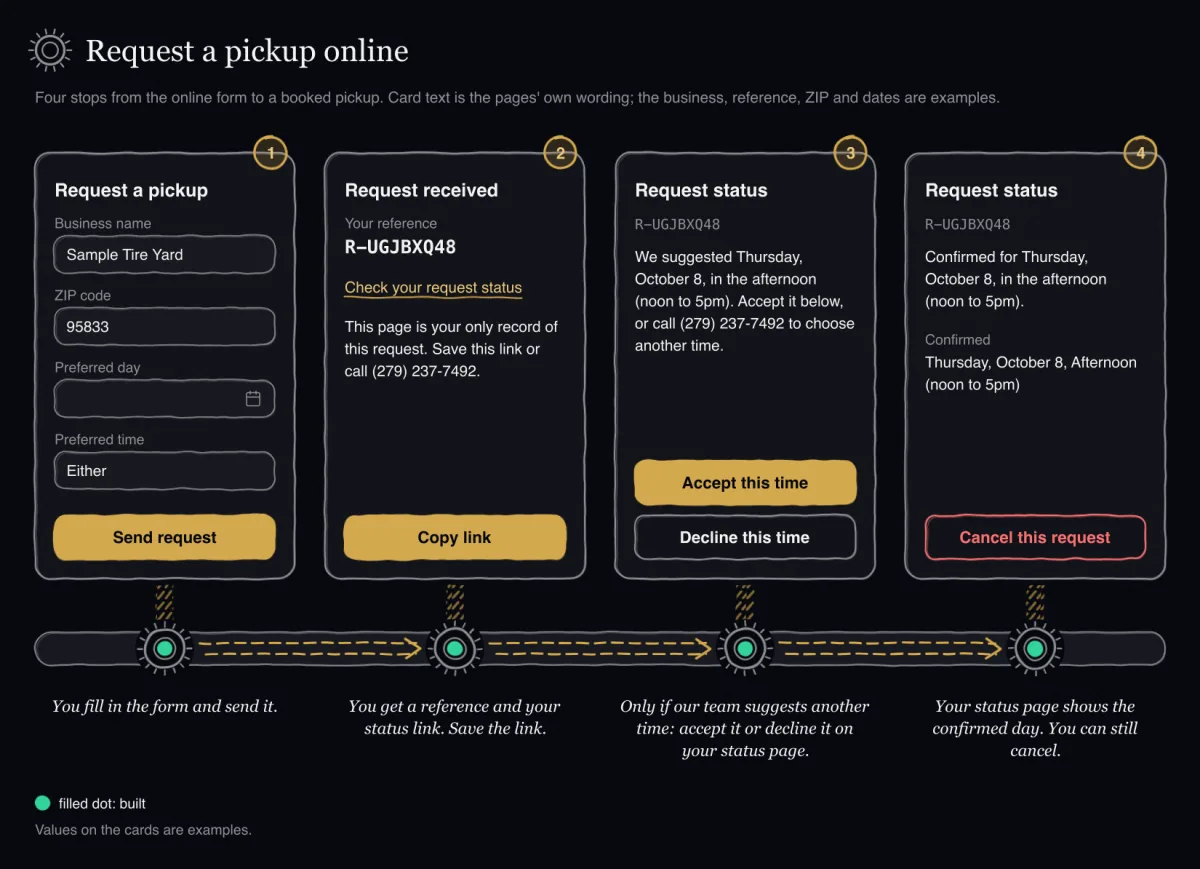
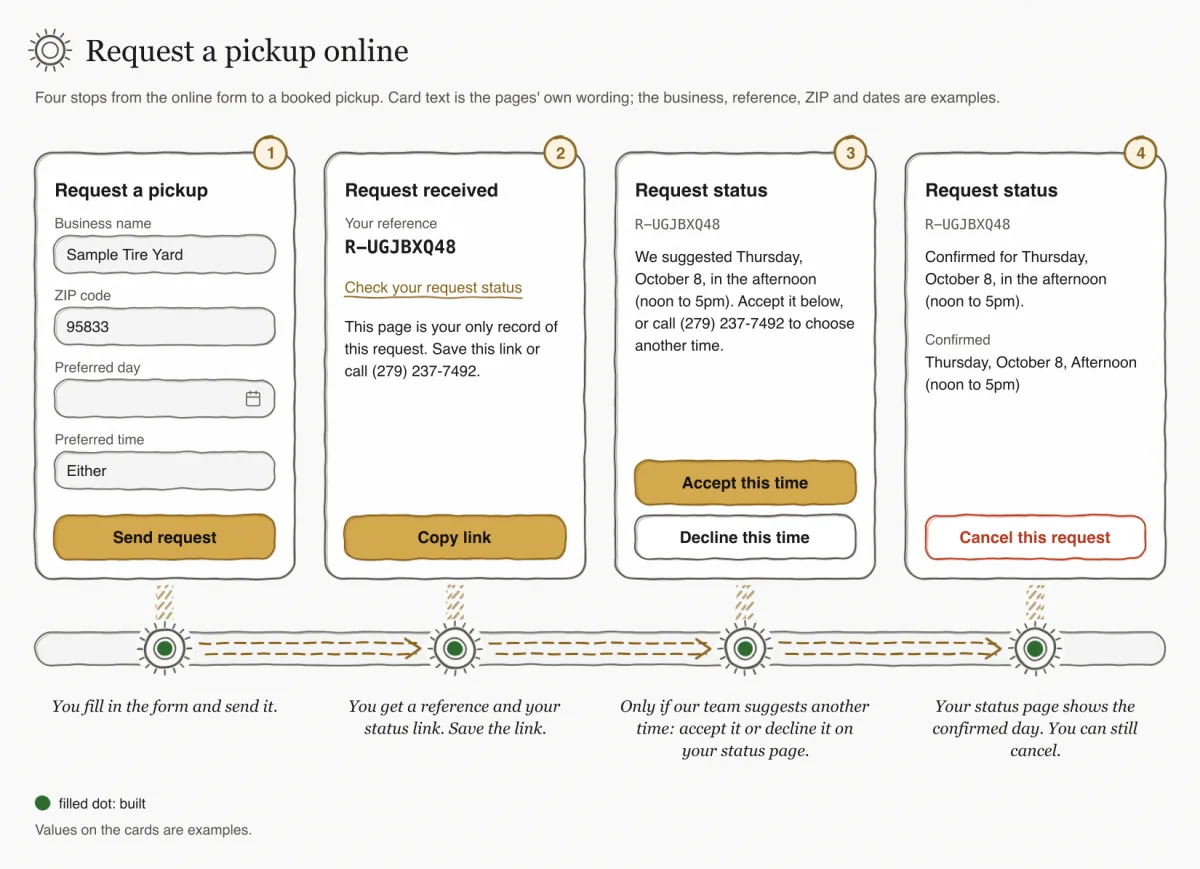
Not yet checked on the live siteThe online form, Request a pickup, is built and passed the website team's checks. It has not yet been checked on the live site.
Not yet checked on the live siteIn a browser check, the form in English and in Spanish followed the light and the dark theme at phone, tablet and desktop widths. Nothing overflowed, and it needed no sideways scrolling on a narrow phone. The check found no WCAG 2.1 A or AA accessibility problem.
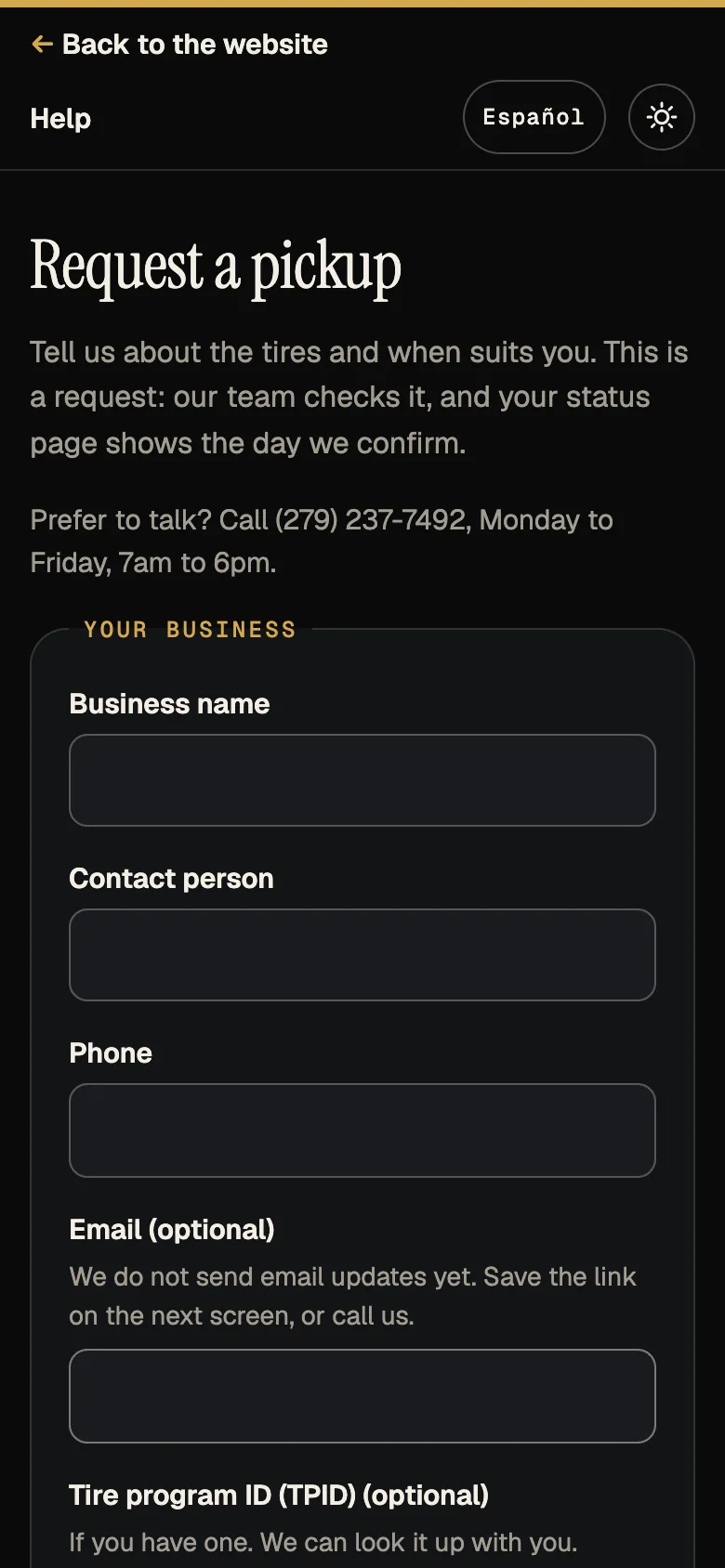
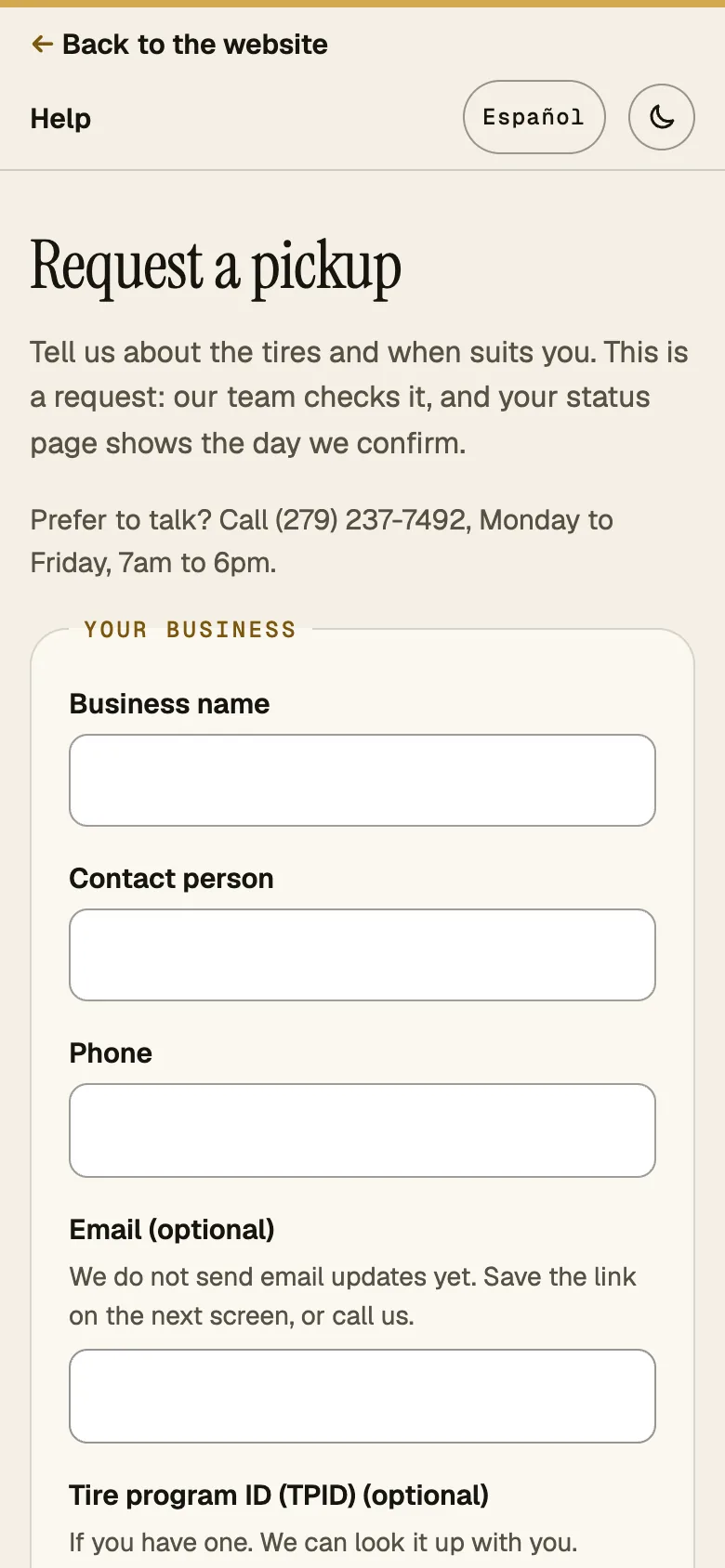
Sending the form is a request, not a booking: our team checks it, and your status page shows the day once we confirm it. The form says: Tell us about the tires and when suits you. This is a request: our team checks it, and your status page shows the day we confirm.
If you would rather talk to someone, the form shows: Prefer to talk? Call (279) 237-7492, Monday to Friday, 8am to 5pm. Closed on federal holidays and on California state holidays that match a federal holiday or are state-mandated.
Not yet checked on the live siteYou do not need an account, and you do not sign in, to send a request.
Getting to the form
Not yet checked on the live siteOn the website home page, the link "Request online" (on the Spanish site, "Solicitar en línea") opens this form. It is in the first section, under "New customers", and again in the section "Request a pickup".
Not yet checked on the live siteThe form has a language link, Español, for reading it in the other language.
From the form to your reference, step by step
- Open the online form.You see: The title Request a pickup, the line Tell us about the tires and when suits you. This is a request: our team checks it, and your status page shows the day we confirm. and, for anyone who would rather talk, Prefer to talk? Call (279) 237-7492, Monday to Friday, 8am to 5pm. Closed on federal holidays and on California state holidays that match a federal holiday or are state-mandated.
- Fill in Your business: Business name, Contact person and Phone, and if you like Email (optional) and Tire program ID (TPID) (optional).You see: The email field says: We do not send email updates yet. Save the link on the next screen, or call us. A phone number that is not 10 digits shows Enter a 10-digit phone number.
- Fill in Pickup location: Street address and city, ZIP code and Yard and access instructions. All three are required.You see: A ZIP outside 90001 to 96162 shows We serve California ZIP codes only. Call us if you are unsure.
- Fill in The tires: about how many, which kinds, whether any are still on rims, and tick Some are good casings we want kept as casings if it applies.You see: The rims question starts at Not sure. If no kind is chosen: Choose at least one kind of tire.
- Fill in Preferred day and time: a weekday after today, the time window, and Notes for our team (optional) if you like.You see: Until 12pm Pacific on a weekday, the Today (same-day request) button and the same-day note appear; from 9am a same-day pickup is not guaranteed. The time starts at Either. A preference, not an arrival time.
- Tick I confirm these details are accurate.You see: Without it the form shows Confirm the details are accurate before you send.
- Press Send request.You see: The button shows Sending…. If anything needs fixing, the top says Please fix {n} item(s) below. and each field shows its own message. Otherwise the page changes to Request received: Received, not yet confirmed. Our team checks it, and your status page shows the day we confirm.Meanwhile: The same rules are checked again when the request arrives, and our team checks the request. Nothing is booked yet.
- Save your status link: press Copy link, and note your reference.You see: Your reference, a code that starts with R- followed by 8 characters, the link Check your request status and the line This page is your only record of this request. Save this link or call (279) 237-7492. After copying, the page shows Link copied
What the form asks for
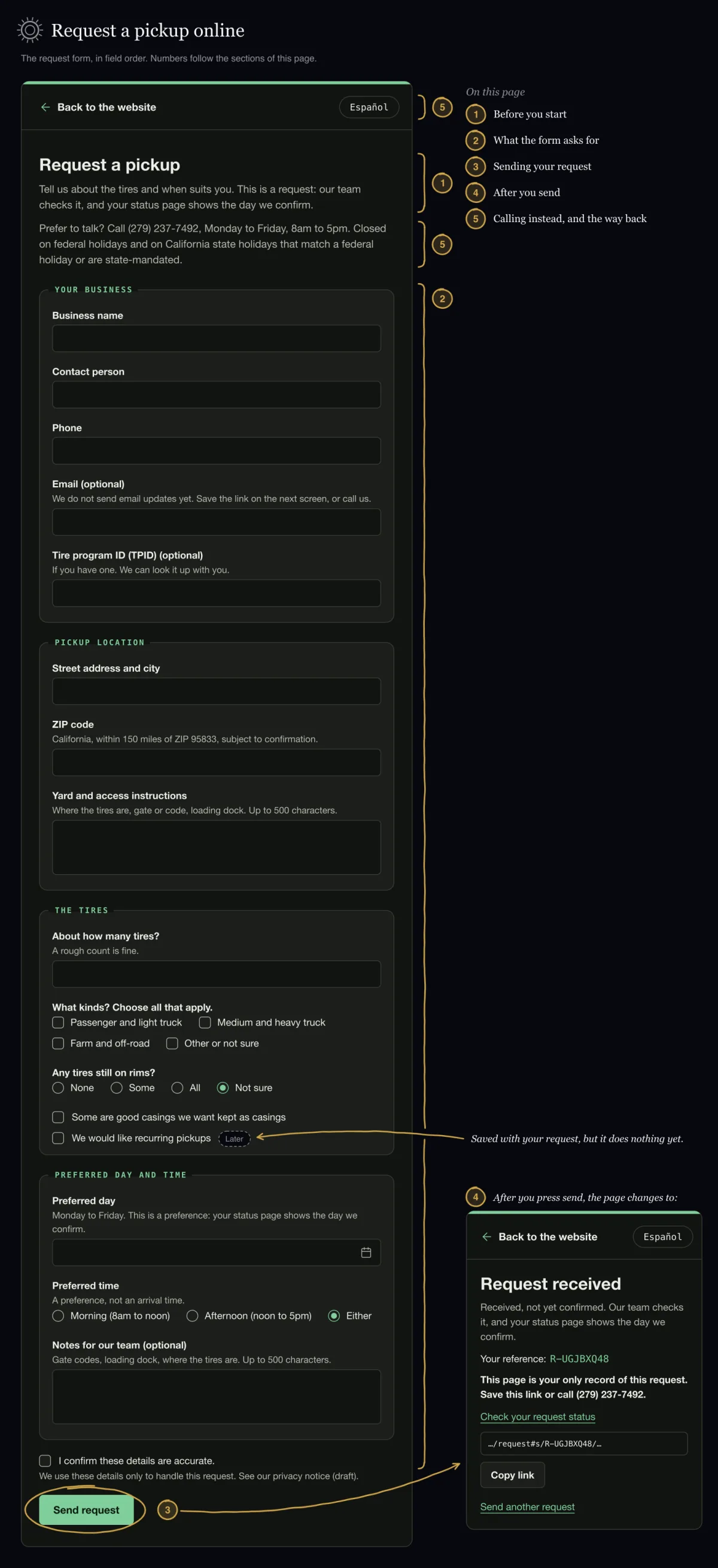
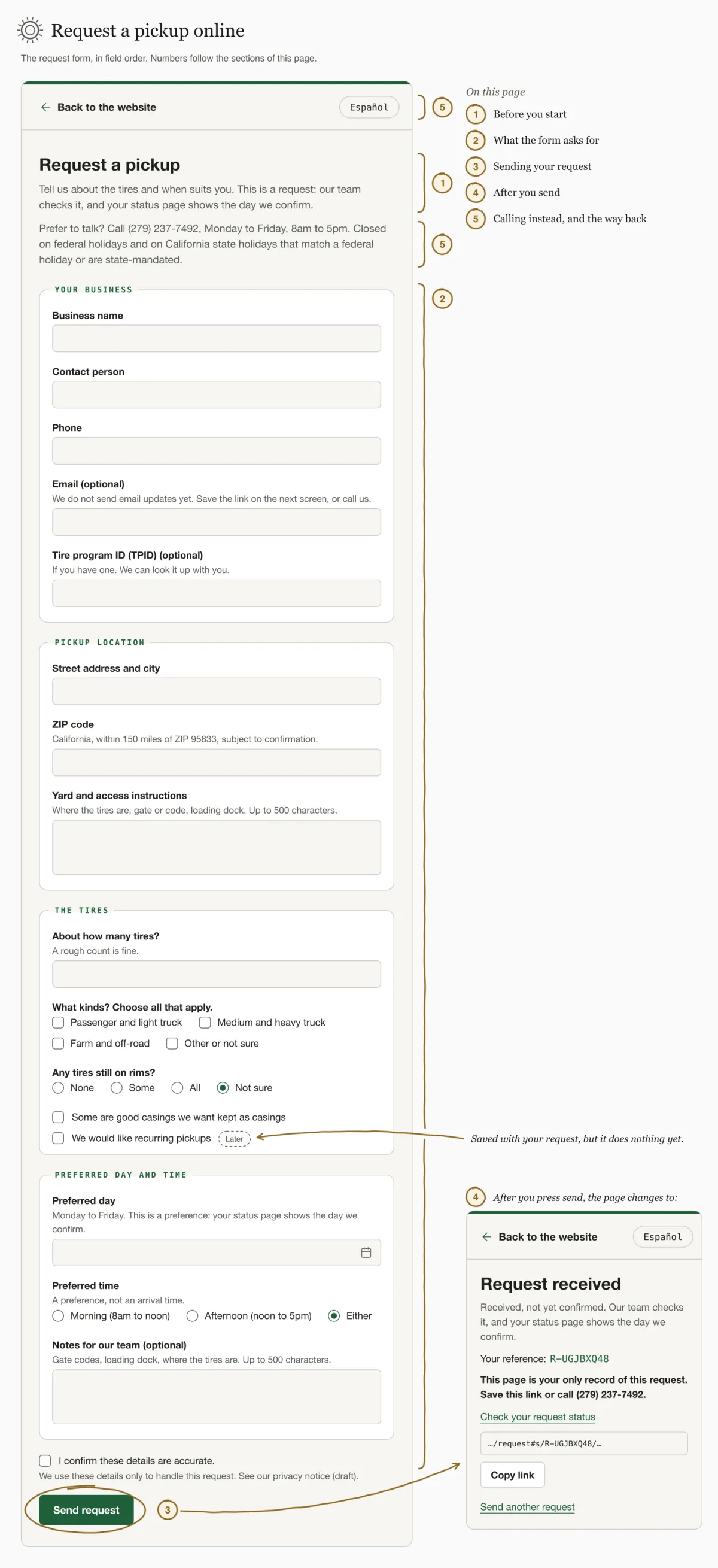
The form has four parts: Your business, Pickup location, The tires and Preferred day and time, then a box to confirm the details. The table shows each field, what it accepts and the message you see if something needs fixing. The same rules are checked again when the request arrives.
| Field | What it accepts | Message if it needs fixing |
|---|---|---|
| Business name | Required, up to 120 characters. | Enter your business name. Keep the business name to 120 characters. |
| Contact person | Required, up to 120 characters. | Enter a contact person. Keep the contact name to 120 characters. |
| Phone | Required. A 10-digit number; a leading 1 is dropped, and the number cannot start with 0 or 1. | Enter a 10-digit phone number. |
| Email (optional) | Optional, up to 254 characters, in the usual name@domain form. | Check the email address, or leave it blank. |
| Tire program ID (TPID) (optional) | Optional. 3 to 20 letters, numbers or dashes. It is what you tell us; the form does not look it up. | A TPID is 3 to 20 letters, numbers or dashes. Leave it blank if unsure. |
| Street address and city | Required, up to 200 characters. | Enter the street address and city. Keep the address to 200 characters. |
| ZIP code | Required. 5 digits, from 90001 to 96162. | Enter a 5-digit ZIP code. We serve California ZIP codes only. Call us if you are unsure. |
| Yard and access instructions | Required, up to 500 characters. | Add yard and access instructions so the driver can find the tires. Keep yard and access instructions to 500 characters. |
| About how many tires? | Required. A whole number from 1 to 10,000. | Enter a number from 1 to 10,000. |
| What kinds? Choose all that apply. | At least one of: Passenger and light truck, Medium and heavy truck, Farm and off-road, Other or not sure. | Choose at least one kind of tire. |
| Any tires still on rims? | One of None, Some, All or Not sure. It starts at Not sure. | Choose an answer about rims. |
| Some are good casings we want kept as casings | A tick box, unticked to start. | None. |
| Preferred day | Required. A weekday after today, Pacific time. Today is offered until 12pm Pacific, Monday to Friday; while it is offered, the Today (same-day request) button and the same-day note appear. From 9am a same-day pickup is not guaranteed. | Choose a preferred day. Choose a weekday. Today is offered until 12pm Pacific, Monday to Friday. |
| Preferred time | One of Morning (8am to noon), Afternoon (noon to 5pm) or Either. It starts at Either. A preference, not an arrival time. | Choose a preferred time. |
| Notes for our team (optional) | Optional, up to 500 characters. | Keep notes to 500 characters. |
| I confirm these details are accurate. | Required. You must tick it to send. | Confirm the details are accurate before you send. |
Not yet checked on the live siteSame-day requests close at 12pm Pacific time: from 12pm, and on weekends, the form no longer offers "Today", and a form left open past 12pm refuses today's date without sending anything. A same-day request sent after 9am is marked with this message: This same-day request was sent after 9am Pacific, so same-day pickup is not guaranteed.
LaterThe form also has a tick box, We would like recurring pickups, unticked to start. Its yes or no is saved with your request and our team can see it on the desk card. Recurring pickups themselves are for later: ticking the box does not schedule anything.
Sending your request
Press Send request. The button shows Sending… while the request goes out. If anything needs fixing, a summary at the top says Please fix {n} item(s) below., and each field shows its own message.
If the connection drops and you press Send request again, the same request is sent again, not a second one: you get the same reference.
One phone number can have at most 3 open requests; past that you see You already have 3 open requests with this phone number. Call (279) 237-7492 and we will help. Too many requests in a short time give Too many requests in a short time. Please call (279) 237-7492 and we will help.
After you send
The page changes to Request received. It says Received, not yet confirmed. Our team checks it, and your status page shows the day we confirm. Below that you see Your reference, a code that starts with R- followed by 8 characters, and the link Check your request status.
Keep that link. The page tells you: This page is your only record of this request. Save this link or call (279) 237-7492. Use Copy link to copy it; the page then shows Link copied. To start a new request, use Send another request.
Not yet checked on the live siteNo email or text message is sent yet, not even if you gave an email address. The email field says so: We do not send email updates yet. Save the link on the next screen, or call us. Your status link is your only record.
What our team sees
Not yet checked on the live siteYour request appears on our staff desk under "Awaiting confirmation". Our team then presses "Confirm requested day", "Suggest day" or "Decline"; the desk is in English, so its controls are quoted in English here. If we decline, the reason reaches you in customer wording, for example Outside our service area. A note our team adds for itself is not shown to you.
Calling instead, and the way back
You can always book by phone instead: Prefer to talk? Call (279) 237-7492, Monday to Friday, 8am to 5pm. Closed on federal holidays and on California state holidays that match a federal holiday or are state-mandated. Many messages on the form end with the same number, so you can call if something does not go through.
The link Back to the website at the top of the form takes you back to the website.